
Quickview Design Project – Richard McHugh Web Designer
01.
The Challenge
Problem:
Users were experiencing “navigation fatigue” when browsing high-density category pages. To see product details or select variations (like size or color), users had to navigate to the Product Detail Page (PDP) and then hit the back button to continue shopping. This friction led to higher bounce rates and interrupted the “discovery” phase of the shopping journey.
The Goal:
To reduce the number of clicks required to add an item to the cart whilst maintaining user context by allowing them to stay on the category list while making a purchase decision.
02.
The Solution: “The Bridge”
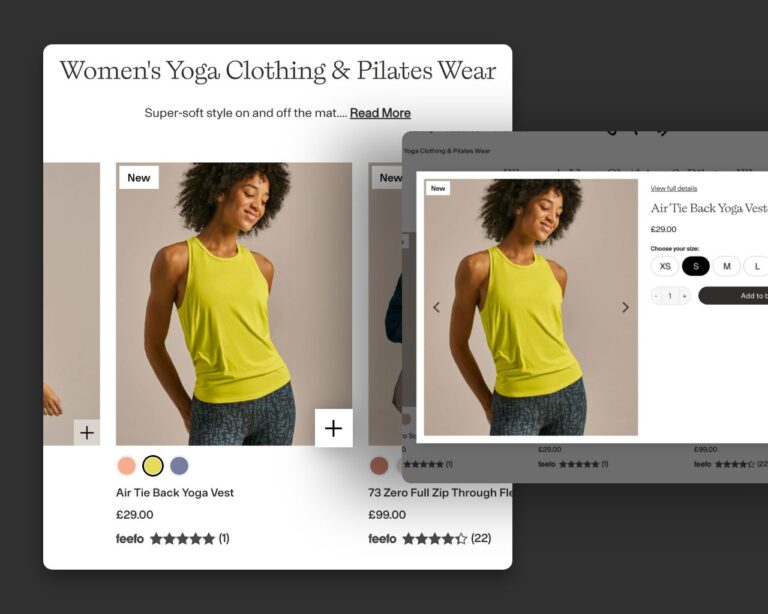
Instead of a full page transition, I designed a Quick View Modal—a lightweight, high-performance overlay that serves as a bridge between the category grid and the checkout.
Key UX Features:
- Context Retention:
Users never leave the category page, reducing cognitive load.
- Mobile-First Design:
Implemented a “Bottom Sheet” interaction for mobile users to ensure thumb-friendly accessibility.
- Essential Info Only:
Stripped back the PDP to only the “must-haves”: Price, Ratings, Size/Colour selectors, and the CTA.
- Micro-interactions:
Included a “Success” state animation upon adding to the basket to provide immediate visual feedback.
03.
Design Strategy & Logic
| Feature | UX Justification |
|---|---|
| Trigger Point | A subtle ‘+’ icon overlay (85% opacity) that transitions to 100% on hover to signify interactivity without obstructing product visuals. |
| Information Hierarchy | Focused on size selection and price. Color swatches were intentionally excluded to prevent navigation friction and keep the user within the category flow. |
| PDP Deep Link | Added a “View Full Details” link to allow high-consideration shoppers to access technical specs without losing their place in the funnel. |
| Accessibility | Ensured the modal is keyboard-navigable (ESC to close) and screen-reader friendly. |
04.
Performance Metrics (KPIs)
- Primary Metric:
Conversion Rate from Category Page to Basket.
- Secondary Metric:
Decrease in “Back Button” usage from PDPs.